



The Problem
On a day to day basis, Amjutan are dealing with hundreds of projects, which each have hundreds of mains and plots. Trying to plan, schedule and track this amount of work is not easy. When we first met the directors of Amjutan, they were concerned that their current workflow processes (a combination of papers, emails and spreadsheets) were just not adequate for the task.
Amjutan’s process is to plan the work for each project and then schedule it for their construction teams to complete. Amjutan had realised that their current planning, scheduling and monitoring processes, was mostly manual and cost them many hours of staff time. On top of this, they discovered that manually completing these tasks was error-prone, with the potential to double book or incorrectly allocate resources and also undercharge due to some items being missed from invoices, such as aborted jobs.
Amjutan were looking for a bespoke system that would allow them to plan a project and then smoothly transition to scheduling and tracking. As projects are central to their work, they required a single place where all information about a project could be found.
The Solution
As customers would not need to access the system, we proposed a desktop application that could be installed on each user’s computer. Data would be shared via a central database. Each logged-in user has to be granted access, via the permission system, to read and modify different areas of the application and data.

Scheduling
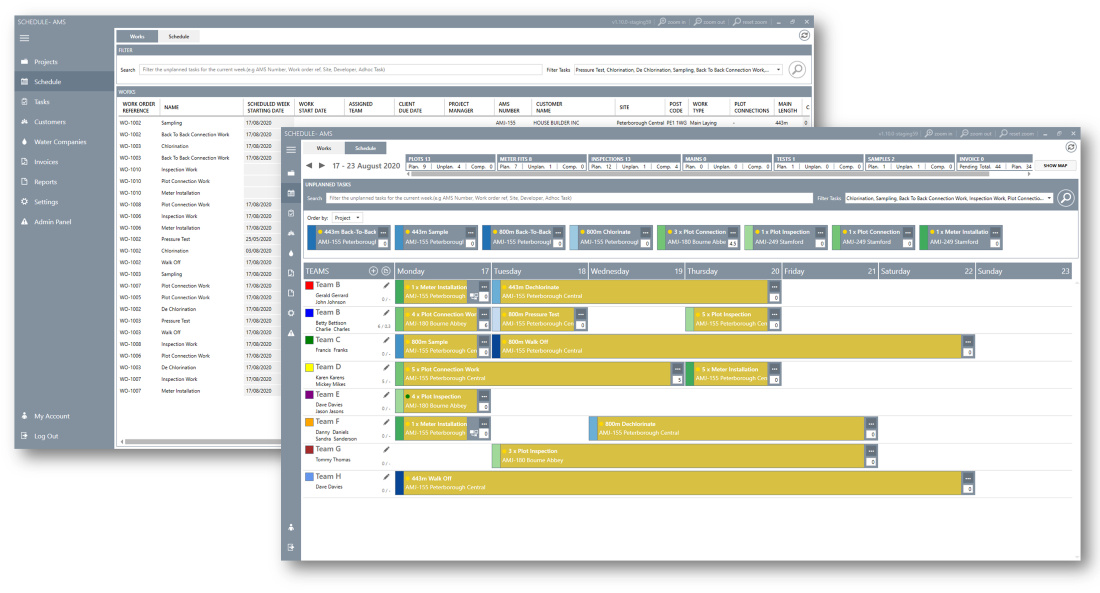
One of the most important areas of the application is scheduling. On the first tab users can view all work in progress (see case study main screenshot). On the second tab a visual drag and drop interface enables work to be scheduled and assigned to a team. Dragging the right-hand edge spreads the work over several days and hovering over the … produces another menu for further options, such as the ability to split the work over more than one team.

On the right-hand side is a slide-out map, that shows all work for the project allocated or unplanned.

Projects
A view that encompasses all data for a single project, with tabbed access for the various elements of the project, from left to right:
- Details – General information, location and map.
- Financials – Amjutan works, water company chargers, asset payments and project total.
- Project Tracking – dates milestones are due.
- Contacts – contact detail’s of persons involved in the project.
- Files – storage of any documents associated with the project, such as site drawings.
- Work Items – the individual pieces of work to complete.
- Work Order – a high level view of the work.
- Comments – notes associated with the project.
- Tasks – tasks created for the project, these would also appear on the main task view.
- Invoices – work to invoice and previously invoiced work.
- Adhoc Work – work that was not on the original plan.
- Mobilsations – extra visits required, for example inspections.

Reports
Overall views of different aspects of the data, for all projects.

Invoicing
An overview of all projects that need invoicing and all invoices that have been created. Clicking into one allows users to see all the details of that particular invoice.

Categorised in: Construction